Napkin sketching
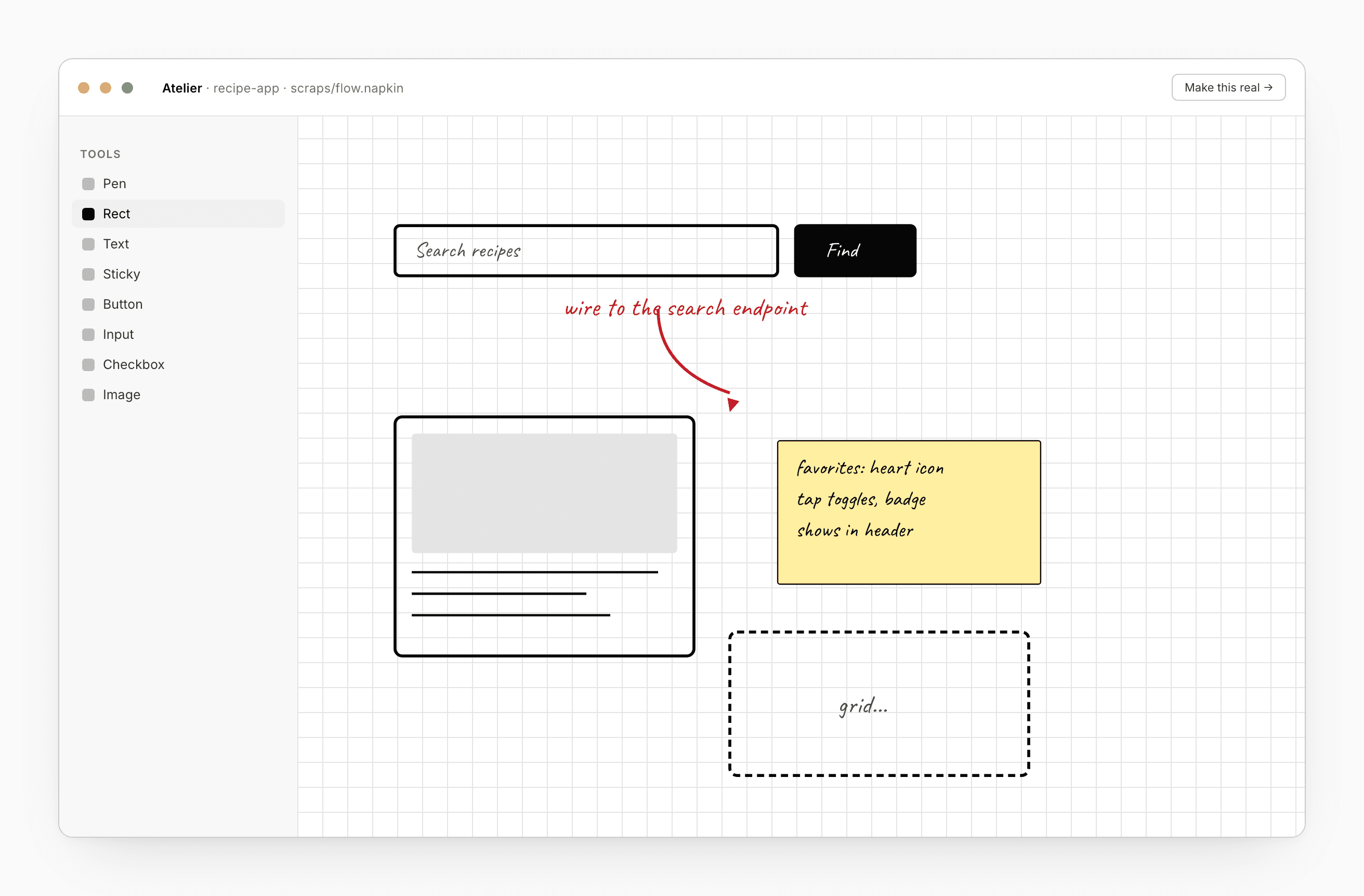
A Napkin is a sketch you can keep inside any project. Strokes, shapes, sticky notes, and a small set of low-fi UI placeholders — buttons, inputs, checkboxes, radios, toggles, dropdowns.
Napkins aren’t a project kind; they’re documents inside a project. The same project can hold a stack of HTML files and a sibling napkin and the chat references whichever one you have open.
Why napkins
The middle ground between “I’m thinking” and “I’m coding”. Tools like Figma fit the late part; pen and paper fit the early part. A napkin sits in between — low-fi enough not to over-commit, structured enough that the chat can read “input next to a button” rather than guessing from pixels.
What you can put on one
- Pen — freehand strokes, any color and thickness.
- Shapes — lines, rectangles, ellipses.
- Text — typed blocks, or sticky notes.
- Images — paste or drop.
- Low-fi UI — button, input, checkbox, radio, toggle, dropdown.
The UI primitives are deliberately shape-only. They tell the chat your intent without committing to a brand. When the agent generates the real thing later, it picks tokens and components from your bound Design system and Component library.
Create one
From the files panel: + add → New napkin. Or ask the chat: “make me a sketch for the dashboard”. The agent drops a new napkin in the project and adds a few starter UI placeholders.
Edit
The napkin viewer mounts a canvas with a tool palette down the side. Pen, shapes, text, sticky, UI primitives, image, plus select / pan / zoom for navigation. Edits autosave.
Hand it to the chat
Open a napkin; the chat references it on the next turn:
- “Make this real.” — the agent reads the napkin and produces HTML/CSS in a new sibling file, bound to your Design system.
- “Add a search input next to the title.” — the agent edits the napkin in place so you can keep iterating.
- “What’s missing from this flow?” — the agent critiques against the project’s seed prompt or PRD.
The agent sees the napkin as structured shapes, not as a screenshot. That’s what makes “input next to button” interpretable.
In a slide deck
A napkin in a slide-deck project can serve as a slide. Ask the chat to “turn this napkin into slide 4” and it rewrites the napkin as a finished slide with your brand applied.
Comments and export
Napkins use the same comment overlay as other previews. Pin a comment to a region; threads and resolve work the same way.
Napkins are included in the Project ZIP and Claude Code handoff exports. They’re not separately exportable on their own — they’re fragments of a project, not standalone deliverables.
See also
- Design — workspace where napkins live
- Chat — how the agent reads napkin objects
- Skills → Wireframe — built-in skill that produces napkins from prompts