Design system
A Design system is the top of the cascade. It’s tokens — palette, typography, spacing, borders, shadows. Versioned. When you publish, every project bound to it picks up the change.
A Design system has no project workspace. You edit the tokens in the DS editor, hit Publish to snapshot them, and roll back to an older version if a publish regresses something downstream.
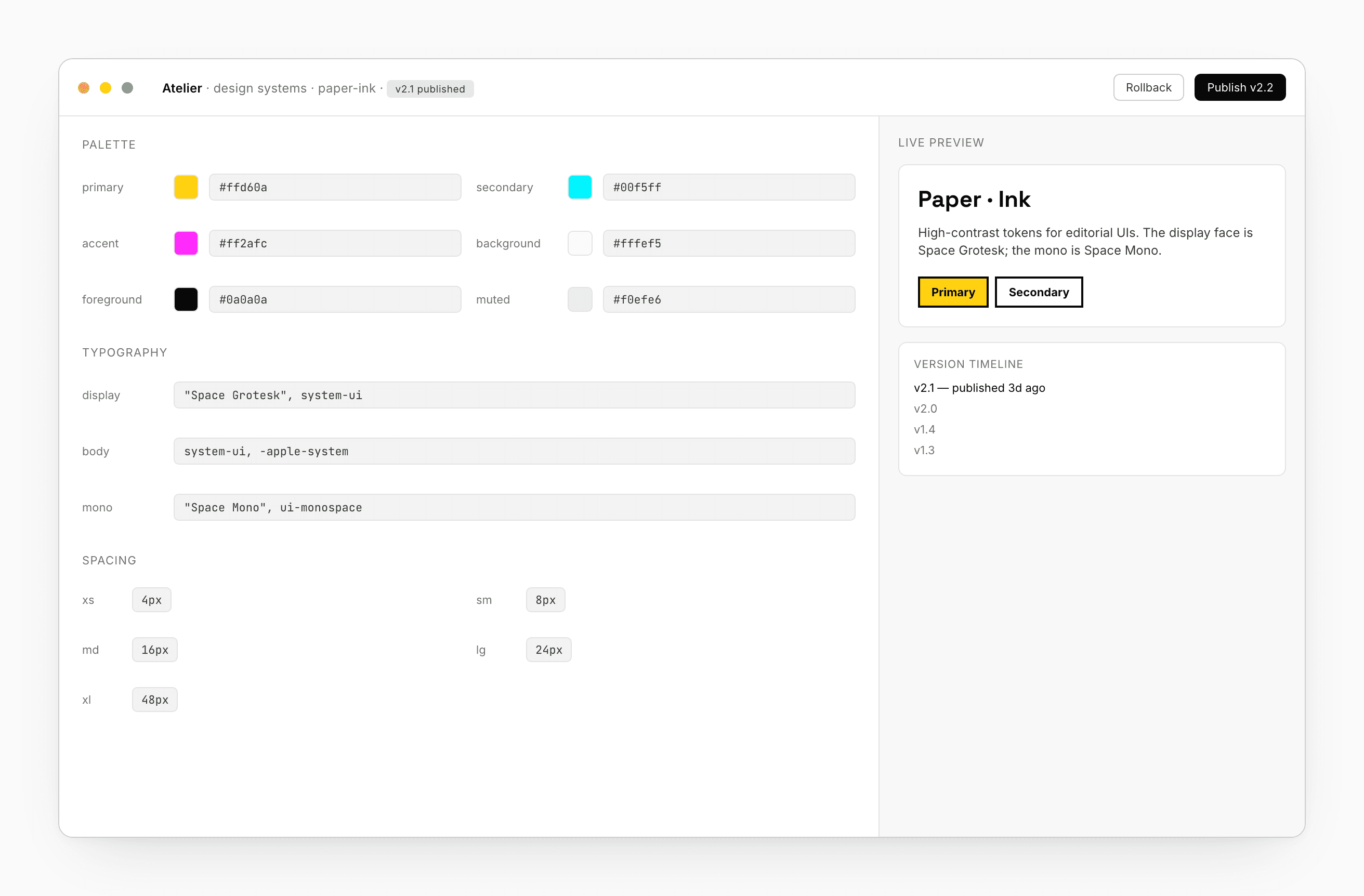
What goes in a Design system
- Palette — primary, secondary, accent, background, foreground, muted.
- Typography — display, body, mono font stacks.
- Spacing — xs through xl.
- Borders — default, thin, radius.
- Shadows — sm, md, lg.
The shape is intentionally append-only. Bound projects materialize tokens as a CSS variable file; your generated code reads them through CSS variables, so changes propagate without re-rendering.
Creating one
From the Dashboard’s Design systems tab → + New design system. A two-step wizard asks for:
- Brand name — appears everywhere the DS is referenced.
- Notes — freeform text describing voice or inspiration. The chat agent reads this when proposing tokens.
- Context (optional) — a GitHub repo to read code style from, a Figma URL to extract palette and type from, a
.figfile to upload, or reference files dropped in.
Submit, and the chat agent drafts a starting set of tokens you can edit.
Editing tokens
Each token shows up as a labeled input. Palette fields get a swatch and a native color picker; everything else is a free-form text input that accepts any CSS value — hex, rgba(), var(...), anything.
A live preview on the right exercises the whole set — type alongside palette alongside spacing — so changes are immediately visible.
The values are saved as a draft until you publish. Edit freely; nothing propagates until you ship a version.
Publishing
Click Publish. Atelier snapshots the draft as an immutable version, bumps the version string, and writes the new tokens into every bound project.
The publish chip on the Dashboard card shows the latest version, or Unpublished changes if your draft has diverged from it.
Version pinning vs floating
Projects choose how aggressively to pick up changes:
| Spec | Behavior |
|---|---|
'2.1' | Exact. Never moves. |
'2.x' | Latest minor publish. |
'^2.1' | Semver — minor + patch, no breaking. |
'latest' | Always the latest, including breaking. |
See Bindings → Version pinning.
Rollback
Click any prior version in the timeline → load it as the active draft → publish to re-promote. The old version stays in the chain; nothing is lost. Bound projects on latest or 2.x move with the new publish.
Share across teams
Design systems are cross-organization shareable. Settings → Sharing invites teammates (or other teams entirely) by email:
- Viewer — can see the DS and bind their projects to it.
- Editor — can edit tokens and publish.
When you invite someone outside your org, the DS appears in their Design systems dashboard under Shared with me. They can bind their own projects.
You retain control: revoking a grant detaches projects bound from the receiving side. See Share + Comments.
What the agent does with it
When the chat generates UI in a bound project, it reads your tokens as prompt context. Colors come from your palette. Type comes from your stack. Spacing comes from your scale. You don’t have to re-prompt your projects when the brand evolves; the agent picks up the latest tokens automatically.
Token blast radius
Before publishing, the editor shows you which pages in which bound projects will move:
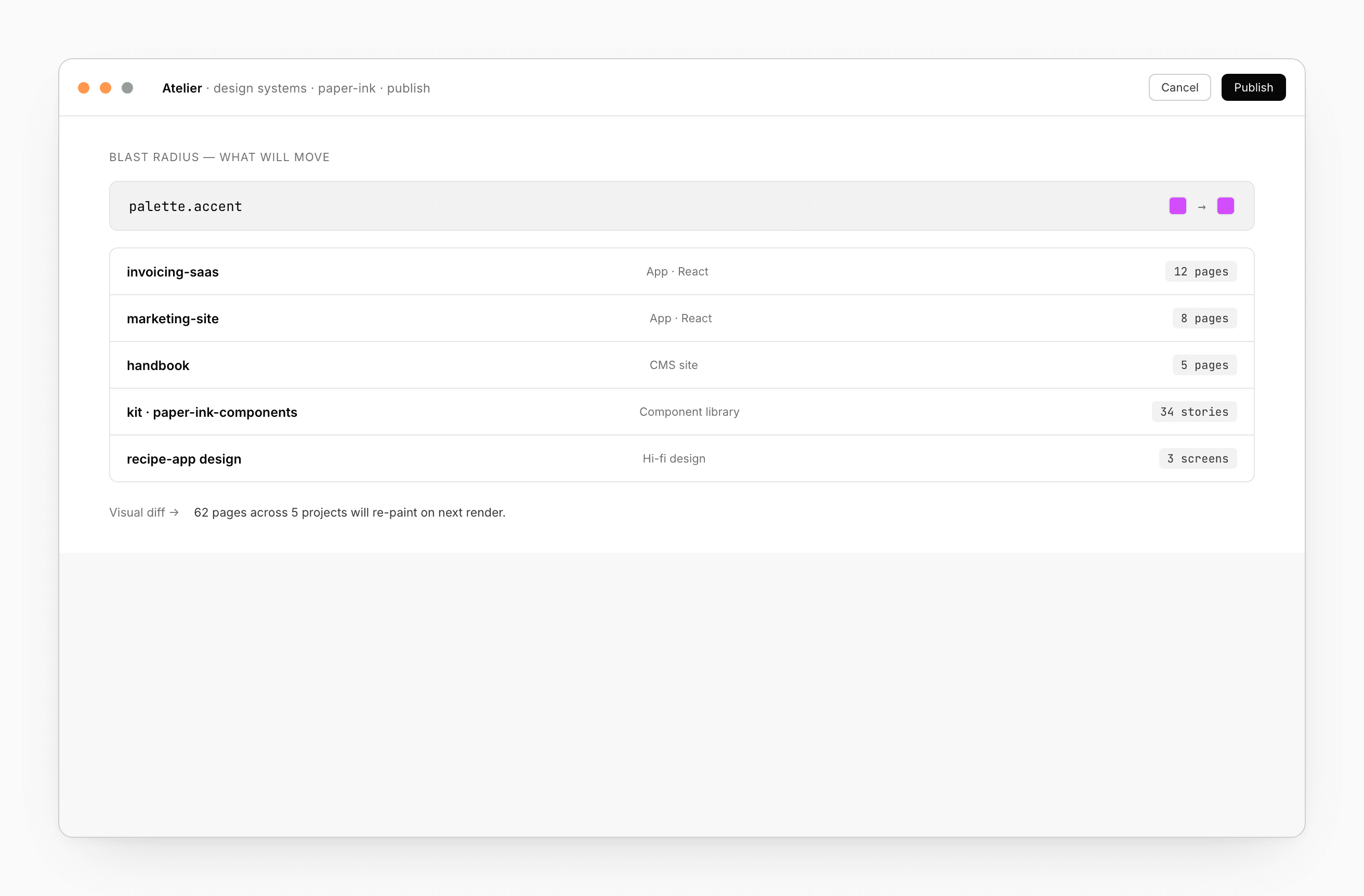
The same data feeds visual regression — change a token, the next PR run pins screenshots of the affected pages and asks for approval before merge.
Downstream reach
A Design system cascades further than the rendered app:
- CMS preview — content authors see the page in your brand.
- Email templates — transactional mail looks like your product.
- Visual regression — token changes don’t trigger false failures.
- OG / social images — share cards stay on brand.
- PDF receipts and invoices — same tokens, same brand.
See also
- Bindings — how a DS propagates downstream
- Component library — the other half of the cascade
- Share + Comments → Share — cross-org sharing