Bindings
A binding is the link from a project to something upstream — a Design system, a Component library, or another Design the chat should reference. Bindings are what turn Studio from “a builder” into “a cascade” — change a token in a DS and every bound app picks it up automatically.
Three kinds of bindings
| Binding | Set on | Source | What it does |
|---|---|---|---|
| Design system | App, Library, Slides, design projects | DS + version | Materializes tokens into the project |
| Component library | App | Library + version | Installs the kit; agent uses your components |
| Design | App | Design + version | Lets the agent read the parent design’s files |
Plus one more layer:
- Per-component override (App only) — point one component (or one family of components) at a different Design system than the rest of the project. Useful for white-labeled sections or experimental subsystems.
Where you set them
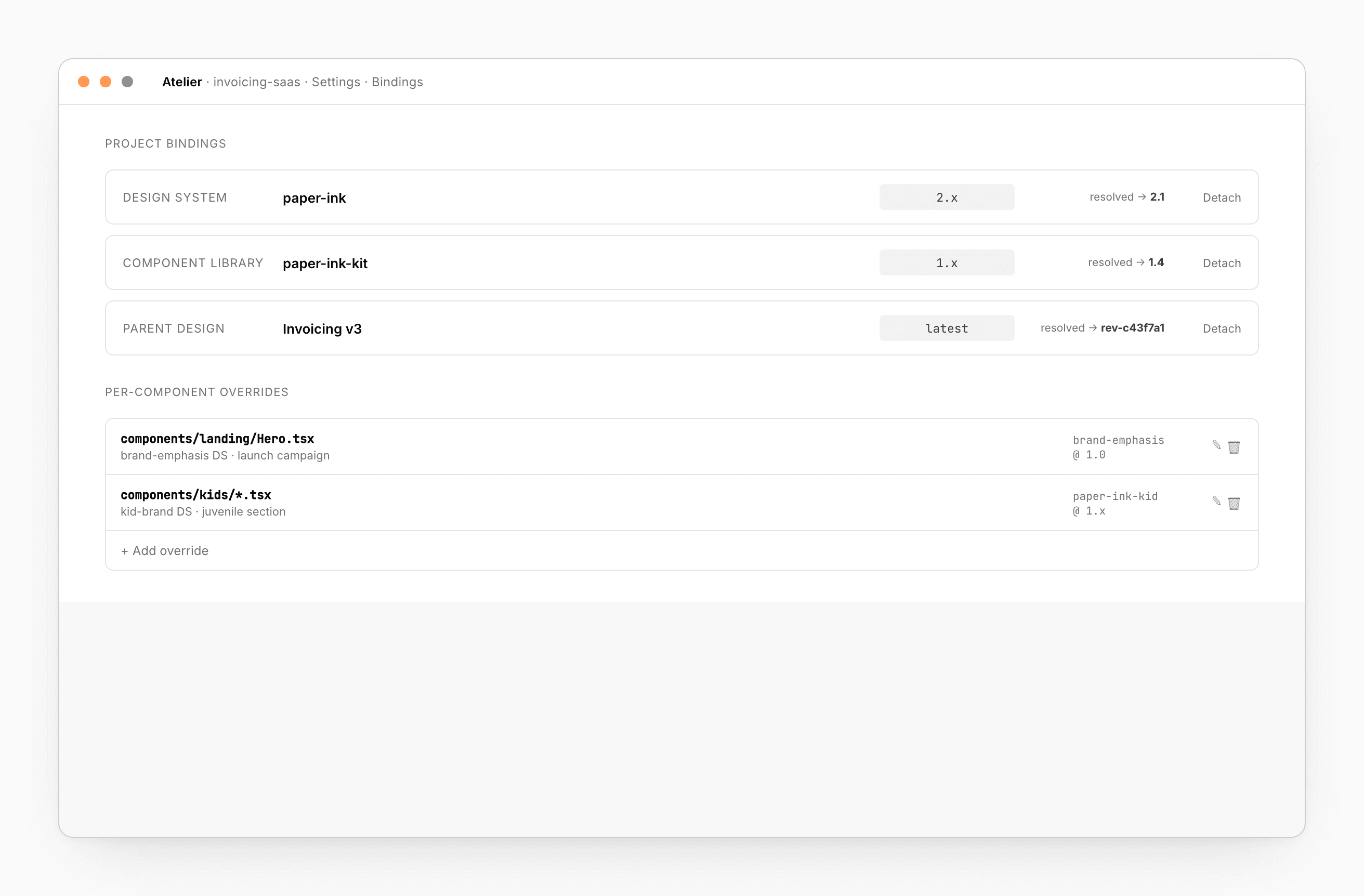
In the project’s Settings → Bindings section. You’ll see:
- The current binding for DS, CL, and Design.
- A version picker per binding (
latest, exact, semver range). - A list of any per-component overrides.
- A Detach option that removes a binding cleanly.
Version spec
| Spec | Behavior |
|---|---|
'2.1' (exact) | Never moves. Publish doesn’t affect this project. |
'2.x' (minor float) | Picks up minor publishes. |
'^2.1' (semver) | Picks up minor + patch within the major. |
'latest' | Always the latest, including breaking. |
Version conflicts (e.g. a library requires DS 3.x but your project is on DS 2.x) surface in the Console with a one-click resolve.
What happens when you bind
When you pick a Design system, Atelier writes tokens into your project as CSS variables you can read from anywhere. Picking a library installs it as a path dependency in your package.json (React) or pubspec.yaml (Flutter) — the agent will import from it instead of inlining markup. Binding a parent design lets the chat read those source files as a fidelity anchor.
The whole flow is automatic. You don’t write tokens to disk yourself; the cascade does it.
How the chat uses bindings
The chat reads your Design system and Component library manifests as prompt context. When it writes UI, it picks tokens from your scale, components from your kit:
// what the agent writes — not generic Tailwind
import { Button, Card, Stack } from '@atelier/cl/paper-ink-kit'

export default function Page() {
  return (
    <Card>
      <Stack gap="md">
        <Button intent="primary">Send invoice</Button>
      </Stack>
    </Card>
  )
}
If a component you need doesn’t exist in your kit, the agent asks where to put it — your library (publish a new version) or as a one-off in the project.
Per-component overrides
Most of your app uses ds_main. The marketing landing page should use ds_brand_emphasis for the launch. Add a per-component override:
| Component path | Design system | Version |
|---|---|---|
components/landing/Hero.tsx | ds_brand_emphasis | 1.0 |
Atelier scopes the new tokens to just that component, layered under the project’s main tokens. Remove the override and the scope clears automatically.
Multi-brand
Bind multiple Design system / Component library pairs on one project — useful for B2B apps that white-label per tenant, or apps that ship a separate brand variant.
Switch at the route or tenant level:
import { useCascadeTheme } from '@atelier/sdk'

export default function Page() {
  useCascadeTheme(tenant.brand)   // 'default' | 'children'
  return <Card>…</Card>
}
Theme switching is a class-name swap — no re-render storm.
Token blast radius
Before publishing a DS change, the DS editor shows you which pages in which bound projects will move. The same data feeds visual regression, so token changes don’t trigger false failures.
How far the cascade reaches
Bindings touch more than the rendered app:
- CMS preview — content authors see the page in your brand.
- Email templates — transactional mail looks like your product.
- Visual regression — token changes don’t trigger false failures.
- OG / social images — share cards stay on brand.
- PDF receipts and invoices — same tokens, same brand.
See also
- Design system — top of the cascade
- Component library — what apps install
- App → Settings — where you bind in an App
- Share + Comments → Share — cross-org grants